If you’ve ever wondered how to get your Google review link the easy way, look no further. In this hands-on tutorial, we’ll walk you through the hassle-free process of generating a link that allows your customers to leave reviews directly on your Google My Business page. This common question will be answered in no time, and you’ll discover how simple it is to generate a one-click link for your customers to review your business.
Creating a link for your customers to leave reviews on your Google My Business profile is extremely simple. Follow these steps:
1. Log into your Google My Business dashboard (by opening your browser and typing “Google My Business”): Log in to your Google My Business account and go to your dashboard. If you have not yet set up an account, it is easy to create one for free: click here.
2. Locate your company page: Find and select your company page in the dashboard.
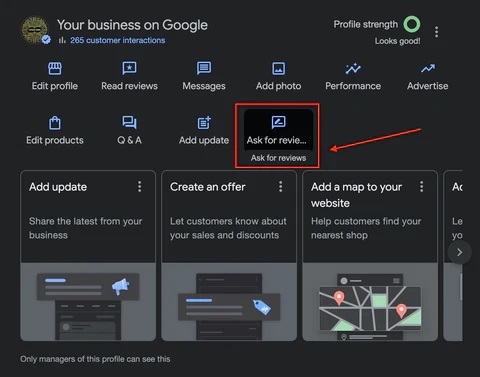
3. Scroll down to find the new options for your Google business profile and click “Request Reviews“.
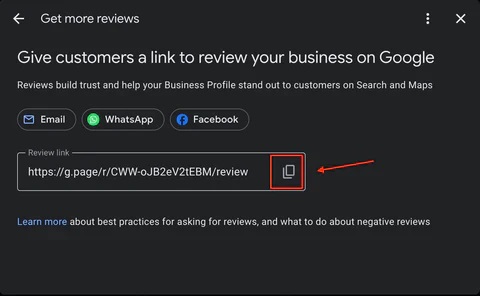
4. In the pop-up window, copy the URL provided (as shown below) and save your Google review link.
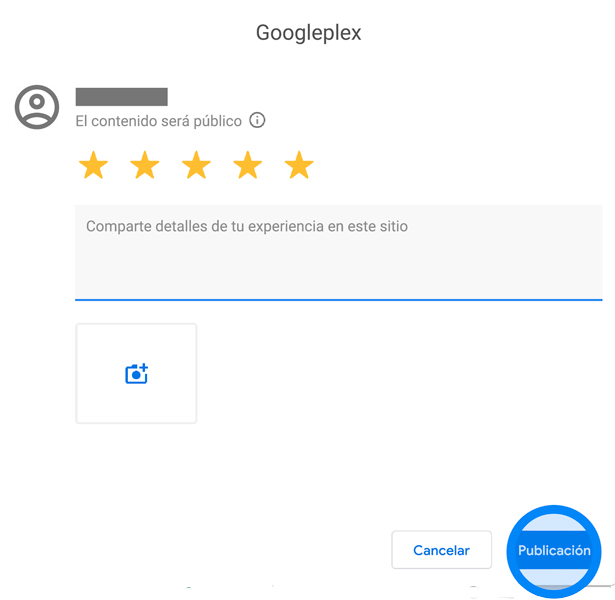
5. Clicking on this Google review link will redirect your customers directly to the Google review form, as shown below: